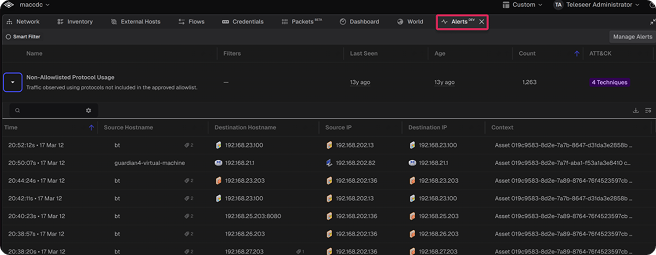
Alerting - Teleseer now features a built-in alerting engine that automatically flags suspicious, prohibited, or otherwise notable network activity. 22 configurable alert types are included, covering threat categories such as beaconing, DoS/DDoS, data exfiltration, credential-spraying, and network segmentation violations. Alerts are generated each topology build, mapped to MITRE ATT&CK techniques, and viewable in a dedicated Alerts panel with per-alert detail and filtering. (Note: Alerting is currently only available for on-prem instances of Teleseer at this time.)
Teleseer Alerting
MAJOR UPDATES
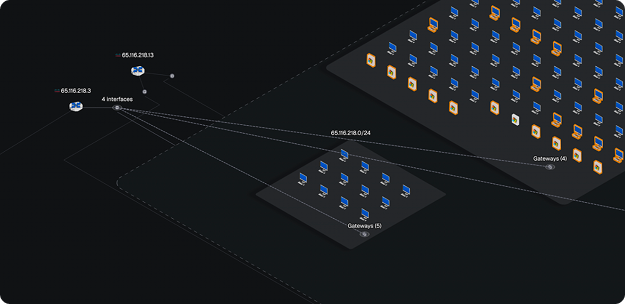
Gateway Interface Visualization
Gateway Interface Visualization - Router interfaces now display a gateway twin interface within their associated subnets. Hovering over either interface highlights the connection to its counterpart. In subnets with multiple router gateways, interfaces are grouped under a single icon. Hovering over the group highlights all linked routers and selecting it reveals a Gateways card with a full table of connected routers.
Ubuntu 24 - New on-prem deployments on version 1.0.14+ are now installed on Ubuntu 24.04, bringing improved performance and support for the latest hardware (R770, R670, Pro Max 18 Plus). Existing deployments will remain on Ubuntu 22.04 and continue to receive updates until an automated migration process is available.
Updated Sidebar Display - The sidebar no longer displays all projects. It now shows only favorited projects and demo projects. All projects remain accessible via the Projects panel, and demo projects can be browsed in the new Demo Projects panel. (Note: Demo Projects are currently only available for cloud instances of Teleseer at this time.)
FIXES
Network Map Rendering - Fixed an error that would appear in the network map view when opening a project while it was still building in DEV mode.
PNG topology exports now reflect the active light or dark mode - using a matching white or black background.
Fixed Dashboard Subnet Details - Restored the missing Flows column, which correctly displays the number of flows per subnet. The duplicate Traffic column has been removed.
3D Mode - Drag-and-select functionality has been restored and changing the color of a protocol in the timeline will no longer hide the associated line in the Network topology 3D mode.
Loading Large Projects in Chrome - Fixed a rare issue where large projects viewed in Chrome would experience a webpage crash.
Timeline Event Selection - Remedied the issue where selecting events in the timeline would display incorrect flows.
World Panel Labels - Labels now load while panning the world view.
Project File Deletion - Deleted project files no longer falsely display in the inspector panel’s project view.
Live Updates - Live ingest operations will always provide up-to-date data when loading more results, rather than potentially stale cached data.
Project Table Loading - Improved scrolling performance on the Projects page for tenants with a large number of projects.
OPTIMIZATIONS & ENHANCEMENTS
Manually Adding Hosts - Eliminated manual Add Hosts button. Manual host population is now exclusively available through a CSV file upload to enrich asset data. Assets are matched by IP or MAC address, with reserved column names mapping directly to asset attributes like hostname, manufacturer, OS, and roles.