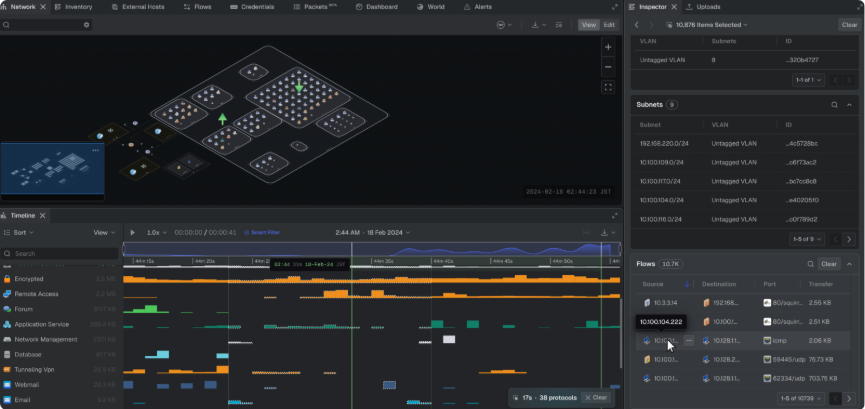
Multi-Select Tables - selecting multiple items in the network topology displays their details as consolidated tables. Items of the same type are grouped into a single table by category. Categories include hosts, private hosts, internet hosts, VLANs, subnets, interfaces, gateways, flows, packets, events, and alert groups.
Navigation - Inspector tables now support inline search, adjustable pagination, and column sorting. Hovering over a row also highlights its correlated item in the topology.
Distinguishability - shaded table styling distinguishes items associated with a selection from items that are part of a multi-selection.
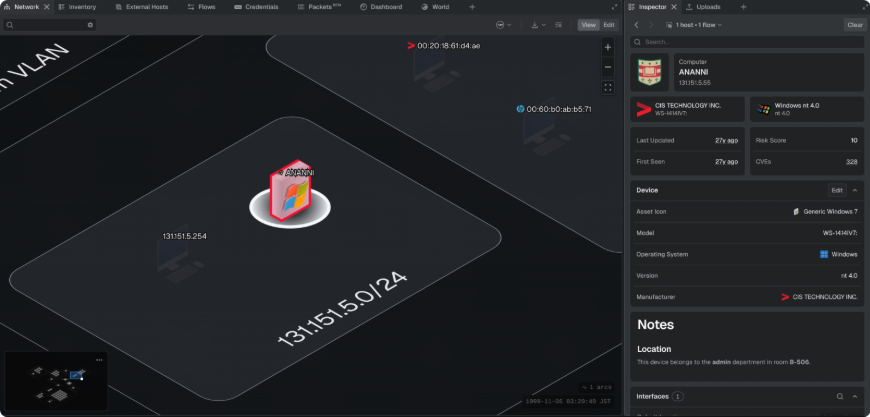
Documentation - notes added to individual assets in addition to the project itself have been enhanced. Project notes use a pop-out editor with a hover preview for longer entries, while asset notes render inline within a scrollable field in the host's Inspector view.
FIXES
Network Topology Visio Export - exporting the network topology as a Visio file no longer fails.
Upload Cancellation - corrected a message that incorrectly displayed "Upload successfully initiated" when a file upload was cancelled.
Host Info Panel Roles - role values in the Host Info panel no longer appear more than once.
Alerts Panel Sorting - corrected an issue where applying a sort to one alert list also changed the sorting state of other alert lists.
Project Overview Data Size - the Data Size value in the Dashboard panel displays as a simplified, human-readable size instead of a raw byte count.
Small Minimap Viewport Frame - resolved an issue where the viewport frame in the small minimap could extend beyond the minimap's bounds.
Username Edit Cancel – cancelling an in-progress username edit now restores the original name instead of preserving the entered values.
OPTIMIZATIONS & ENHANCEMENTS
Network Topology Switch Placement - assets with the switch role are now placed at the top level of the network topology instead of being grouped within a zone, presenting a more intuitive layout structure.